For custom home builders and remodelers
Hand over the house, and every answer.
How do I clean the wood floors? Every client gets an app that answers it out of their home's own documents, and a printed binder of those documents. Both go out under your name, not ours.
- Bosch SHP78CM5N Dishwasher, use and care Found
- ecobee thermostat Manual Found
- Kohler kitchen sink Care guide Found
What it takes off your desk
Fewer hours in the worst week of the job.
The handover lands in the same week as the punch list, the final clean and the walkthrough. Handover takes the assembly off your hands and runs it while the house is being finished, so the week costs your office a review pass instead of a person, and your client still gets the standard you would hand over with a month to do it.
- The manual, found for you. For the exact model on your list, from the maker's own site.
- Filed and named, not dumped. Every document in its section, the same way on every house.
- Serial numbers and trade contacts, as you build. Not chased through the whole job in the last week.
- Care instructions for every finish. From the maker or the trade body, so the warranties hold.
- It presents like the house does. A printed book with your cover, not a stack of photocopies.
How it works
From your selection list to their front door.
You send in what you already have. The platform does the collecting. You approve what goes out.
What you already have
A selections print, or a spreadsheet.
Handover goes and finds it
You review, correct and approve.
What your client gets
Both carry your name, not ours.
Send in the house
A selections print from your construction management software, Buildertrend or JobTread or whatever you run, or an Excel file, or a spreadsheet export. It gets read into a product list by section and room, with makes and models pulled out, for you to look over and correct.
It goes and finds the documents
Manuals from the manufacturer for each model. Care instructions for each finish, from the maker or the national body for that trade. Warranty registration pages, with the terms and deadlines each manufacturer actually states. What it cannot verify, it hands back to you named.
Hand it over
Publish, and your client's app is live that minute. Print the binder from the same content, cover and dividers and page numbers included, and hand it across the counter with the keys.
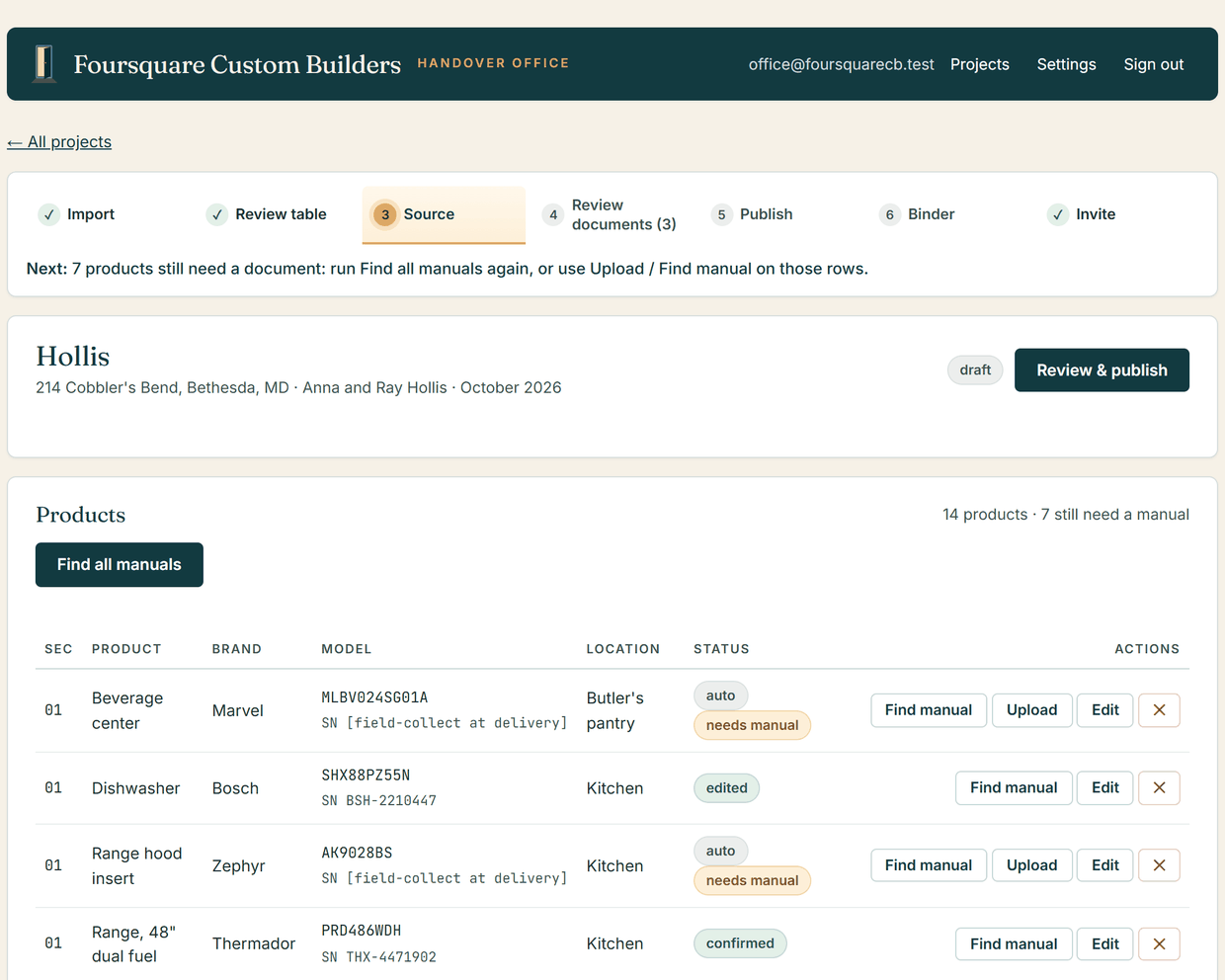
48 found 7 need a look 2 skipped
Done. 48 of 57 found automatically.
7 need a look, and each one says why. Everything found is a draft until you publish.
- Dishwasher, Bosch: found at bosch-home.com
- Refrigerator, Whirlpool: found at whirlpool.com
- Tankless water heater, Rheem: found at rheem.com
- Interior paint, flat: care guide written under your brand (no manufacturer document worth borrowing)
- Range hood insert, Thermador: right-looking use and care found at a retailer, confirm it and upload it
- Freestanding tub: refused a specification sheet, which is not care or operating instructions
- Quartzite counters: skipped, no brand on the row, so there is nothing to search for
- and 50 more on the same list
Next: look at 7 documents, then Review and publish.
The app
What your client gets.
One place they go with a question.
Instead of texting you on a Sunday, they look it up, and the answer is right for their house. Free to them, on their phone, in your colors, with the printed book on the shelf as well.

Every number they would ring you for. The trades who worked on the house, each with a button that dials. The call goes to the plumber, not to you.

A straight answer, out of their own documents. The question repeated back, then the steps, taken from the manuals filed for that house and no others.

The whole house, sorted. The same numbered sections as the printed binder, so the app and the book agree with each other.

Your client gets the app from the App Store, then signs in with the email address you already have for them.
Nothing for your client to remember.
No password, nothing to sign up for, nothing to pay. They put in the email address you already have for them, a six-digit code arrives, and they are in.
More than a folder of PDFs.
What to do each season, how to look after every surface, and which warranties to register before the window closes. Written for their house, printed under your name.
The binder
A book that lives in the house.
Plenty of owners want something physical, and a book is what they picture when you say you are handing over a manual. It sits on a pantry shelf and it is still there fifteen years later, still looking like your company made it on purpose. Hand it across with your welcome letter and the keys.
- A table of contents with real page numbers, not estimates, and a printed divider for every section.
- Quick reference at the front: emergency and trade contacts, then the appliance inventory with model and serial.
- Laid out for double-sided printing, so each manual starts on a fresh sheet.
- One finished file, printing the same content that is in the app, so the two never disagree.
Your company
Home Care & Warranty Guide
The Smith Residence
123 Maple Lane, Bethesda
Delivered June 2026
Contents
The answers
Answers that come out of the documents.
Your client asks a plain question and gets a plain answer, taken from the manuals for the things actually installed in their house, with a straight line to the trade who should handle it if it is not a five-minute job.
From this house's own documents.
A document reaches your client only when it came from the company that made the thing, or, for the care of a surface, from the national body for that trade. The right-looking manual on a reseller's site is never attached quietly.
A short path to the right trade.
Every home carries its own contact list: the plumber, the electrician, the HVAC company, the roofer, each with a number that dials from the answer. When it is a service call, they call the right person instead of calling you first.
The dangerous ones come back to you.
Gas, electrical, shutoffs, temperatures, cleaning chemicals. If the specifics are not in this home's documents your client is sent to you, not to the general answer, which is often wrong for the exact model sitting in that house.
They can check it themselves.
Every answer names the product and model it came out of, and one tap opens that manual at the right page. That is what a good binder always let them do, and it is why they believe the next answer too.
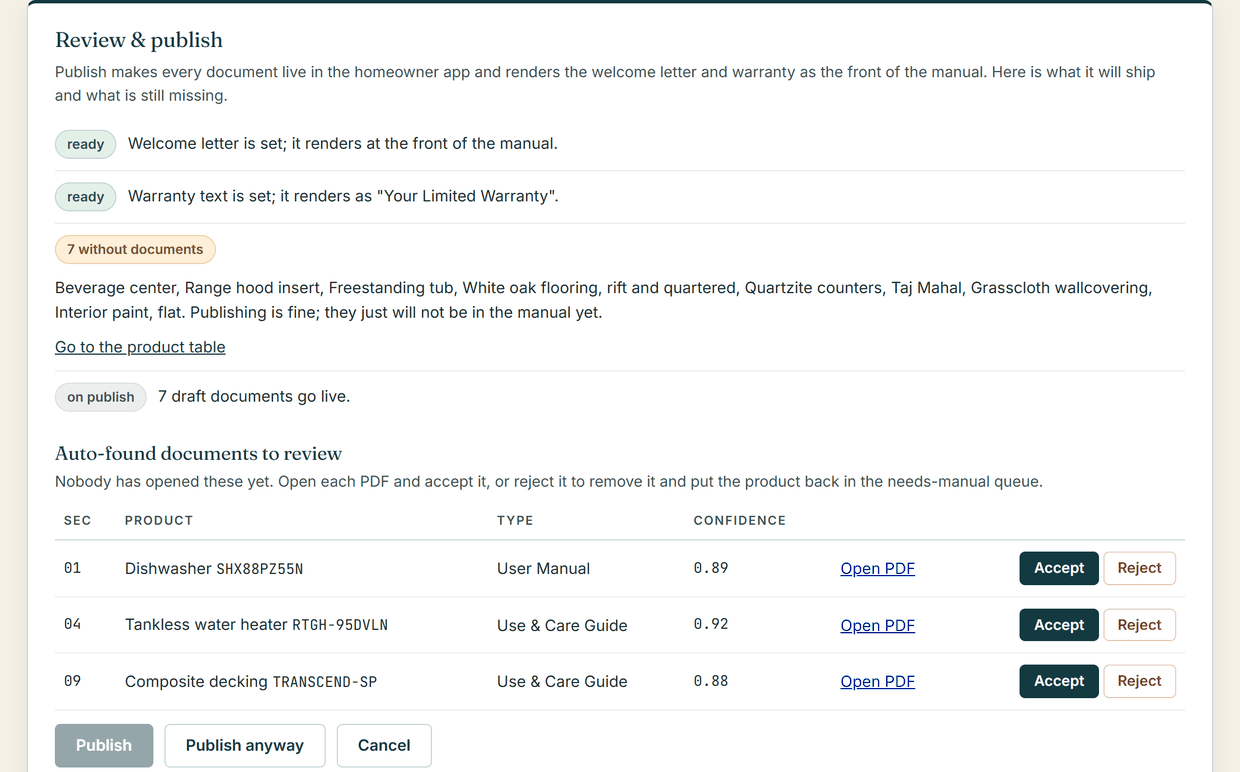
- 1 You see what it found. Every document it attached is listed, with the PDF one click away.
- 2 You settle what it could not. Confirm it, swap it, or upload your own copy in its place.
- 3 You publish. Nothing goes to your client until you send it, and it is your call, not the software's.
Your name on it
An asset with your name on it, years after closing.
The handover is one of the moments the relationship is made. It is the last thing you hand them and the first thing they use, and this one keeps working after you leave: every time they look something up over the next fifteen years, they open something with your name on it.
They open your company, not our software.
Give it your logo and two brand colors once. From the moment your client signs in, the app in their hand is in your palette with your name at the top of the screen.
Every printed page came from your office.
The welcome letter, the warranty, the quick reference pages, the registration guide, the care instructions and the cover. As far as your client can tell, you produced all of it.
Your name on it from the first house.
It is your product and you are paying for it, so it goes out as yours on the first home you do, at whatever you are spending. There is nothing to upgrade to first and nothing for your client to ask about.
Their house, and nobody else's.
Your client sees their own home and nothing else, and your projects stay yours, separate from every other builder on the platform.
Against how it gets done now
Handover versus a binder somebody assembles.
Most builders either hand over a box of paperwork or put a person on it for a week.
| Assembled by hand | Handover | |
|---|---|---|
| Finding the documents | Drawers, boxes, emails to subs, whatever is still online | Searched for you, from the manufacturer's own site |
| When it happens | The week you have the least time | As the home is built, finished with a review pass |
| Care instructions | Usually skipped, or written from a guess | Per finish, from the maker or the trade body |
| What is missing | Found out by the client, a year later | Handed back to you named, before it goes out |
| After they move in | They call you | They look it up, and call the right trade if they need one |
| The next house | Starts over from nothing | Same standard, same sections, every time |
Pricing
Priced per home, with one small yearly fee for the company.
Your first home is $99, so you see what it finds on a real house before you commit to anything. Every home after that is $249, paid when you hand the house over. One yearly fee, sized to how many homes you have live, keeps all of them working.
First home
The full product on one real house: every manual found, the app under your name, the printed binder. Your first year of the company fee is included.
Every home after
Finding and verifying the documents, the branded app, the binder and the care guides. Paid at handover, so it can go on the job as a line item.
Keeping them live
- Up to 20 delivered homes: $99 a year
- Up to 100 homes: $199 a year
- More than 100: $399 a year
Manufacturers move their manuals and Apple changes the rules every year. This is what keeps every home you have delivered working.
The binder and every document are always yours to download. If the yearly fee stops, the app goes read-only. Nothing is deleted. Pricing is not final and early access builders will be told before anything changes.
Questions
Things builders ask.
Do I have to gather all the manuals myself?
No, that is the part the platform does. It searches manufacturers for the right document for each model on your selection list, and it attaches a document only when it came from that manufacturer's own site. Anything it cannot verify is handed back to you named, and you can upload your own PDF for any product.
What do I have to send in to set up a home?
Your selections. A selections print from your construction management software works, whether that is Buildertrend, JobTread or something else, and so does an Excel file or a spreadsheet export. The list is read into a product list you review before anything is sourced, and you can add or correct products by hand.
What does my client have to do?
Nothing before you hand it to them. You add their email address, they get a message saying their home is ready, they type in the six-digit code emailed to them and they are in. No password to remember, nothing to sign up for and nothing to pay.
Whose brand is on it?
Yours, from sign-in onward. Your logo and colors theme the app the moment your client signs in, and the welcome letter, warranty, care guides, quick reference pages and binder cover all print on your letterhead. The one screen that is ours is the sign-in screen before that: it carries the Handover name, tells your client the app is their home's owner's manual provided by their builder, and links here. Someone opening a link from an email is owed a plain answer about what the app is and where it came from. Everything past that screen is yours.
How does the AI work, and what happens when it cannot find something?
Two places. When you set a home up, it goes looking for the manufacturer's document for each model on your list, and it only attaches one that came from that manufacturer's own website. When your client asks a question later, it answers out of that home's own documents and checks its own answer against them before anyone sees it.
Either way, when it cannot find something it says so rather than filling the gap. A document it cannot verify is listed for you with the link, to confirm or replace with your own. An answer the documents do not support is replaced with your name and phone number.
Does it only work for houses I just finished?
No. If you can produce the selection list, a home you handed over years ago can be built the same way. Older homes are usually more work up front because the selection data is messier.
What does it cost?
$99 for your first home, then $249 per home, paid when you hand the house over. One yearly fee for the company keeps every delivered home live: $99 a year up to 20 homes, $199 up to 100, $399 above that, with the first year included with your first home. The binder and every document are always yours to download; if the fee stops, the app goes read-only and nothing is deleted. Pricing is not final and early access builders will be told before anything changes.
Who makes this?
A working custom home builder. Handover started as the homeowner manual one building company outside Washington DC hands its own clients at closing, built by hand for years before it became software. That company's homes run on it today.
Early access
The next house you finish could hand itself over.
Tell us what you build and how you hand it over now. You will get a real reply about where Handover stands and what it would take to put your next client in the app, from the builder who made it.
Prefer email? info@lockten.ai
Ask for early access
This form posts with JavaScript, which is switched off in this browser. Rather than send your name and email somewhere they would end up in a web address, here is the direct line.
Tell us what you build and how you hand it over now. The same person reads it.
Four boxes. A person reads every one of these.
No newsletter and no drip sequence. We use this to write back. Privacy.